
What's included
Folders and multi-select
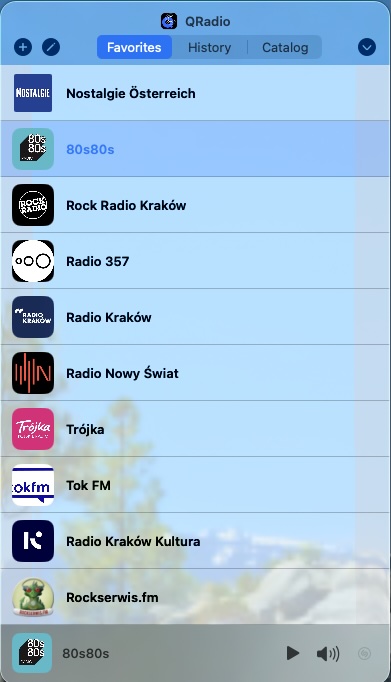
Group favorites into folders, and select several stations at once to file them into one or remove them together. A folder shows its stations' logos, or a symbol you pick from the icon palette. Folders and their icons sync with your iPhone, iPad, and Apple Watch.
Lives in the menu bar
No Dock icon, no window clutter. Click the icon, your favorites drop down, pick a station.
Full station catalog
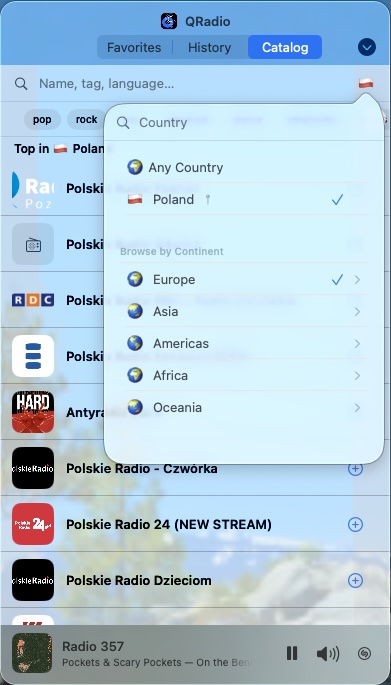
Browse the full QRadio station database, with the best-known stations sorted first. Filter by country, search by name, and use catalog tags that match the selected country.
Now Playing everywhere
Artwork, artist, and title appear in Control Center and on the lock screen. Media keys just work.
Apple Music integration
Real-time song recognition with a one-tap link to open the matched track in Apple Music.
Open songs in Spotify
Prefer Spotify? Pick it under Open Songs In and identified songs open there instead - shown whenever the Spotify app is installed.
Desktop widgets
Put favorites on the desktop or in Notification Center: click a station to play it, play or pause the current one with a live play/pause button, and see your active station highlighted - all without opening the menu bar panel.
Verified stream choices
Catalog and manual favorites can include multiple stream URLs. Pick the codec or bitrate that works best, and QRadio keeps the selected stream with your favorite.
Song history
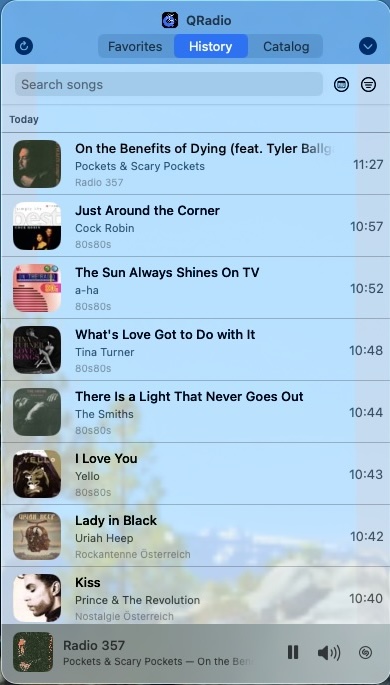
Tracks roll into a searchable history with artwork and timestamps, filtered by station or by date - today, the last week or month, or a range you choose. Disable history per station when talk, news, or metadata noise should stay out of the list.
TV stations, as radio
Some catalog stations broadcast television. QRadio plays their audio and ignores the picture, so a music TV channel listens like any other station.
Recent stations
A dedicated Recent tab keeps the streams you actually played close at hand. Remove single entries when you want to tidy the list.
AirPlay
Stream to HomePods, Apple TVs, or AirPlay speakers straight from the menu.
iCloud sync
Favorites, selected streams, playback settings, and history preferences sync with QRadio on iPhone, iPad, Mac, and Apple Watch.
Skip the pre-roll
Per-station "Connect at Start" opens and drops the stream a few times before playback. It helps bypass ads some stations inject at the beginning of each new listener session.
Sleep timer
Set a countdown from any station; QRadio fades to silence and stops cleanly. Drift off without leaving streams running overnight.
QRadio Audio Engine
Custom-built audio engine with faster stream start, smarter buffering, and wider server compatibility.
Per-station volume
Each station remembers its own volume offset, so a quiet talk show and a loud rock stream don't blast you when you switch.
Buffering modes
Pick how QRadio trades start speed for smooth playback from the Buffering menu - Automatic (balanced on WiFi, larger on cellular), Fast, Stable, or Manual - and still tune the buffer for any single station when you need to.
Live song ID via Shazam
Recognise the track currently playing on any stream. QRadio reads the PCM straight from playback, so there is no second connection to the server.
Backup and restore
Export your QRadio settings to a single file, then restore on a fresh install or another Mac.
Web catalog
qbus.pl/radio/catalog lets you browse the same full station database from any browser, including stations with verified alternative streams.
Encrypted backups
Backup files use an encrypted QRadio envelope. Favorites and settings stay protected if the file is copied through mail, cloud storage, or another transfer path.
Sleep timer in the menu
Pick a duration straight from the chevron settings menu: 1 to 180 minutes, or Off. The active preset gets a checkmark and the menu label shows remaining minutes.
Verified catalog stations
Stations from the catalog are marked as verified and stay in sync as catalog data changes. Stream choices, logo, and name stay current while buffer and volume overrides remain yours.
Cross-device buffer sync
Your custom WiFi and cellular buffer settings follow you between iPhone, iPad, and Mac via iCloud, alongside favorites and song-history retention.
Synced playback preferences
Recent Stations, Smart previous/next, Auto Reconnect, Now Playing, and Apple Music lookup settings follow you between iPhone, iPad, and Mac.
Handoff to iPhone or iPad
While a station plays, open the menu bar panel and QRadio appears on your nearby iPhone or iPad - in the app switcher and on the lock screen. Open it there and the same station continues while the Mac stops. Handoff from iPhone or iPad to this Mac works the same way, arriving at the end of the Dock.
Stop other devices
Optional iCloud playback ownership pauses QRadio on your other devices when playback starts on this Mac. Unlike Handoff, this works over iCloud, so the devices don't need to be near each other.
Smart previous and next
Transport buttons follow the list you're using - Favorites, Recent, History, or Catalog - so skipping stays in the current context.
Exclude from History
Per-station toggle that silently skips song history recording. Useful for talk radio or news stations whose metadata clutters your listening log.
Warmup cooldown
Set a 1-30 minute window after a pre-connection warmup. If you reconnect within that time, QRadio skips the warmup for faster second plays.
Stream fallback
When enabled, QRadio can try the other streams for the same station if the selected URL is unavailable. It stops after one full pass if none work.
Network recovery
When the connection drops mid-stream, QRadio quietly keeps trying and resumes playback on its own the moment the signal comes back - no need to press play again.
Smarter song matching
Fuzzy metadata deduplication stops near-identical ICY updates from flooding history. Technical junk suffixes are stripped automatically so Apple Music lookup finds the right track.
Shazam on more streams
Stream recognition now works on legacy Shoutcast stations that serve raw audio without proper content-type headers.
Merge stations in history
One station often arrives under several names - Trójka and Polskie Radio 3, Eska ROCK and Eska Rock. Manage Stations lets you merge them into one entry, which takes the name and logo of the station you merged into, and separate them again later. Merges sync to your other devices.
Delete history per station
Remove everything one station recorded, with the number of songs named before you confirm. The rest of your history stays untouched.
Your own names and logos
Rename a catalog station or give it your own logo, and the catalog's own name stays underneath. Both live behind one Personalize row, so the editor stays short.
Save history only for favorites
Optional: record songs only from stations you keep in Favorites, so stations you try from the catalog leave nothing behind. Off by default.
Station branding stays out
Bumpers and slogans that streams send as song titles are filtered by how often they recur rather than by a word list, so the history stays songs.
History arrives from everywhere
Songs recognised on your iPhone, iPad or Apple Watch appear here as they sync, with no refreshing - and the same the other way round.
Nothing cut off
Hover a song or a station to read its full name, with a station's country and format, or click a cover in History or the player for the whole title and artist. Right-click for Copy Song, and Share for any station.
Arrange the tabs
Put Favorites, Recent, History and Catalog in the order you use them. The order syncs via iCloud, so the Mac's tab strip, the iPhone tab bar and the iPad sidebar all match.
Installation
- Download the DMG above.
- Double-click to mount, then drag QRadio into Applications.
- Launch QRadio - a small radio icon appears in the menu bar at the top of your screen.
About this build
QRadio for Mac shares the same audio engine, favorites, and catalog search as QRadio for iPhone. It's designed as a menu bar companion - always there, never in the way.
Favorites sync automatically via iCloud between your Mac, iPhone, and Apple Watch - add a station once and it appears everywhere.
Playback moves with you too. Handoff passes the current station between this Mac and a nearby iPhone or iPad, and because the offer carries the stream details, it plays even if the other device doesn't have that station saved. Handoff is a system feature, so both devices need to be signed in to the same Apple Account with Bluetooth and Wi-Fi on, near each other, and Handoff enabled in Settings.
System requirements
- macOS 26 (Tahoe) or later
- Apple Silicon or Intel (universal binary)
- Internet connection
Support
Questions or feedback? See Support or email radio@qbus.pl.